Introduction If you're about to browse Goyard items on fashionreps, the most important thing before checkout is not finding the "best-looking" discount, but confirming whether the coupon actually applies to your current item, amount, shipping method, and package arrangement. This guide only covers verifiable checks, does not provide unconfirmed codes, and does not guarantee savings. This article is for buyers who have already selected an item and are about to enter t
Editor score 4.2 / 5
Introduction
If you're about to browse Goyard items on fashionreps, the most important thing before checkout is not finding the "best-looking" discount, but confirming whether the coupon actually applies to your current item, amount, shipping method, and package arrangement. This guide only covers verifiable checks, does not provide unconfirmed codes, and does not guarantee savings.
This article is for buyers who have already selected an item and are about to enter the checkout page. After reading, you should be able to complete a documented coupon check; if the page doesn't show coupon rules, item information is incomplete, or package limits cannot be confirmed, you should postpone your order. 🔎

The Specific Purchase Task for This Goyard Coupon Check
First, narrow the task to a clear scenario: select one Goyard category item, confirm its current page price and visible specifications, then enter the checkout page to check if the coupon applies, and finally determine whether the discounted package plan still meets the destination, shipping method, and budget requirements.
Do not mix multiple items, multiple proxy platforms, or multiple destinations into one judgment. Item prices, stock, shipping routes, taxes, and coupon conditions may change separately; mixing comparisons will prevent you from knowing which aspect the coupon affects.
The verification date for this check is October 17, 2026, and the displayed amounts are based on the USD reference prices visible on the page. The page price is not the final amount you will pay; you usually need to separately check domestic shipping, warehousing or handling fees, international shipping, destination country taxes, and possible insurance costs. 📅
Fix the Item, Quantity, Specifications, and Current Page Evidence
Before entering checkout, first record the following fields:
- Item name or page title
- Quantity, recorded as 1 by default
- Color, size, or model; write "unconfirmed" if not shown on the page
- Page display price and currency
- Current stock or availability status
- Category the item is in
- Selected shopping agent or checkout portal
- Page screenshot time
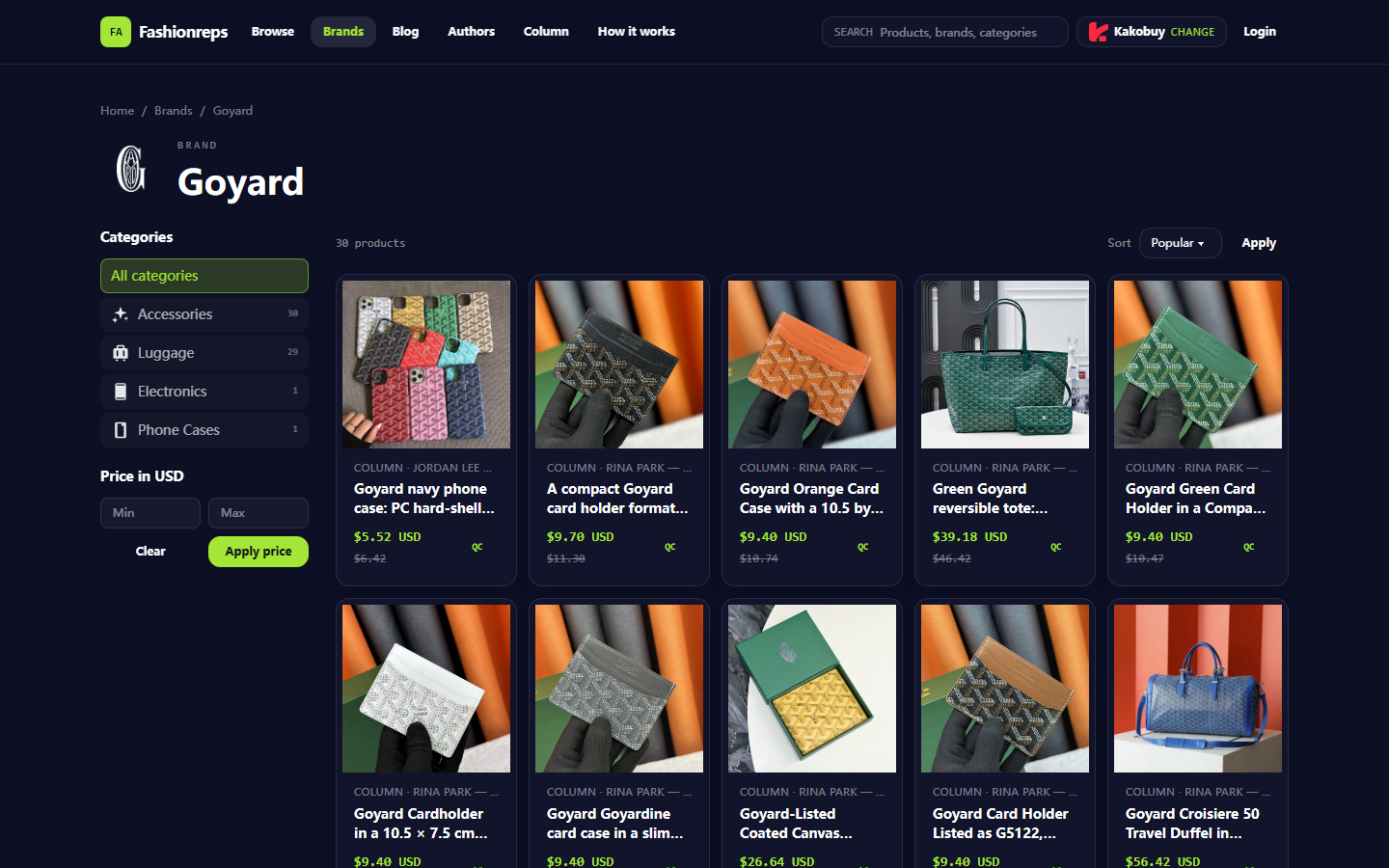
The currently visible Goyard category page shows categories such as Accessories, Luggage, Electronics, and Phone Cases, and offers USD price filtering. In the page sample, card holder items have reference prices around $9.40 to $9.70, and some travel bags and backpacks have reference prices over $50. These prices can only serve as page records and cannot be treated as stable quotes or final payment amounts.
If the item title, specifications, stock, or price changes after adding to cart, use the latest information in the cart and checkout page and keep records of before and after. Do not assume that a specific color or size is in stock just because the category page still shows the item.
Find and Record the Official Coupon's Applicability Statement
The currently provided Goyard category page evidence only supports product categories, visible page names, reference prices, and filter information; it cannot prove the existence of a currently valid coupon, nor that any code applies to these items. Therefore, do not enter a specific code, do not speculate on discount rates, and do not treat historical strikethrough prices as stackable discounts. ⚠️
If the checkout system provides a coupon entry, read the rules from the current account, current order, or current shopping agent's coupon page, and record the following:
- Identifiable marker of the coupon name or code
- Discount type: amount off, percentage off, or shipping fee reduction
- Minimum spend amount and calculation method
- Applicable items, categories, stores, or order scope
- Excluded items, brands, special routes, or specific warehouses
- Whether it requires new users, specific accounts, or specific payment methods
- Start and end times and time zone
- Whether it can be combined with site discounts, shipping discounts, or other coupons
- Specific reason shown when it fails
If the rules are only displayed in a popup, campaign page, or account-exclusive area, save page screenshots and verification time. If you cannot see the complete terms, mark it as "conditions unconfirmed" and do not calculate prices using the most favorable interpretation.
Check the Amount Threshold, Category Restrictions, and Package Conditions
The minimum spend for the coupon must be calculated according to the rules. Some promotions only count the item subtotal, while others may exclude shipping, taxes, insurance, warehousing, or value-added services. Record the item subtotal and order total separately to avoid misjudging that the threshold has been met using a total that includes shipping.
| Check Item | Fact to Confirm | Action if Unconfirmed |
|---|---|---|
| Amount threshold | Whether calculated based on item subtotal, tax-inclusive amount, or other | Do not claim threshold met |
| Category scope | Whether Goyard category or specific items are excluded | Do not treat category page name as coupon eligibility |
| Stacking rules | Whether can be combined with product discounts, shipping discounts, or other coupons | Estimate as non-stackable until page clearly shows otherwise |
| Package limits | Whether affected by weight, volume, route, declaration, or category rules | Pause selecting package plan |
| Validity period | Start/end dates, time zone, and account applicability | Record as unconfirmed |
Also check package restrictions separately. Combining packages may reduce duplicate initial weight or some handling costs, but may also increase volumetric weight, single-parcel declared value, and single-loss risk; splitting packages may incur more fixed fees but may be more suitable for routes, weight, or category restrictions. Do not conclude that combining packages is always more cost-effective just because the coupon reduced the item amount.
For items with brand logos, accessories, packaging boxes, or different material descriptions, confirm whether there are shipping restrictions, declaration requirements, or additional inspection risks based on the current shipping service and destination country regulations. Do not pursue discounts through under-declaration, splitting to avoid taxes, or evading inspections. 🧾
Check Whether the Coupon Can Be Successfully Applied at Checkout
Follow these steps in order:
- Keep only the fixed item, quantity, and specifications in the cart.
- Record the item subtotal, shipping, and other displayed fees before applying the coupon.
- Enter the coupon code or select one from the account's available coupons.
- Confirm whether the page clearly shows the deducted amount, not just "selected."
- Check whether the discount applies to the item, shipping, or other fees.
- Review whether the package weight, volume, route, and estimated fees have changed.
- Record the total after application, any error message, or excluded items.
- Before payment, reconfirm stock, price, destination country, and tax notices.
Only when the checkout page clearly shows the discounted amount can the coupon be counted in the current estimate. If the page only shows promotional text, campaign banners, or "might be available," treat it as not applied. If the order amount decreases after applying but international shipping or other fees increase, re-evaluate based on the complete order cost. ✅
How to Stop Making Assumptions When Price, Stock, or Coupon Information Is Missing
If any of the following occurs, do not continue filling in results with speculation:
- Item page has no clear name or specifications
- Checkout page price differs from item page price without explanation
- Stock status not shown or adding to cart fails
- Coupon rules lack minimum threshold, validity period, or exclusions
- Coupon entry shows success but order amount unchanged
- Checkout page does not explain which fee the discount applies to
- Shipping method, destination, or package restrictions unconfirmed
- Page requires account conditions or payment methods that cannot be met
At this point, you can submit a brief inquiry to the shopping agent's customer service, asking them to confirm the specific item, destination, order amount, and coupon conditions. Do not send full order numbers, payment card information, passports, complete shipping labels, or other unnecessary personal data. Until customer service provides a verifiable answer, keep that field as "pending confirmation."
Save Page Timestamps, Screenshots, and Unconfirmed Fields
Create an order verification record that includes at least:
- Verification date and time zone
- Item page screenshot and checkout page screenshot
- Item name, specifications, quantity, and page price
- Summary of the original coupon rule text
- Item subtotal, shipping, and order total before and after application
- Package weight, volume, or route notes
- Confirmed fields and unconfirmed fields
- Customer service inquiry time and response content
Screenshots should cover names, addresses, phone numbers, order numbers, payment information, and account identifiers, but must not cover item prices, coupon status, fee details, or error messages. When the page updates, re-verify; do not reuse old screenshots over time to prove that the current coupon is still valid.
Final Decision: Continue Verifying, Consult, or Postpone Order
Continue verifying if: the item and specifications are fixed, price and stock are visible, coupon rules are complete, the checkout page clearly shows the discount, and shipping route and package restrictions are confirmed.
Consult if: item information is basically clear, but at least one key field—minimum spend, category exclusions, stacking rules, package restrictions, or fee allocation—is missing.
Postpone the order if: the coupon can only be inferred from promotional language, the checkout page shows no actual discount, price or stock is inconsistent before and after, or using the coupon requires unconfirmed package splitting, declaration, or shipping methods.
This record does not confirm any currently available Goyard coupon or fixed discount, so no definite savings amount can be calculated. The amount that can be saved can only be calculated after the checkout page shows the actual discount; the corresponding increased risks mainly include coupon expiration, shipping changes, package restrictions, tax changes, and increased single-parcel value. This verification method suits buyers who want to keep evidence before paying and confirm each condition; it is not for those who treat historical prices, unverified codes, or other people's order screenshots as current guarantees.