Introduction When you're about to buy Montblanc accessories, the discount shown on the checkout page doesn't necessarily equal your final savings. What you really need to check is: whether the item amount qualifies for the discount, whether service fees change, whether payment fees and packaging fees increase, how shipping is calculated, and what the actual charge is after currency conversion. This guide focuses
Editor score 4.2 / 5
Introduction
When you're about to buy Montblanc accessories, the discount shown on the checkout page doesn't necessarily equal your final savings. What you really need to check is: whether the item amount qualifies for the discount, whether service fees change, whether payment fees and packaging fees increase, how shipping is calculated, and what the actual charge is after currency conversion. This guide focuses on the fashion-reps product discovery and external shopping agent checkout process to help you complete a verifiable total cost check before submitting your order.
This article does not provide unverified current discount amounts, inventory, shipping costs, or lowest price conclusions. The following judgments should be based on the information displayed on the checkout date, destination country, selected shopping agent, currency, and shipping route. ✅

Clarify the Discount Verification Task and Evidence Boundaries for Montblanc Accessories
The specific task of this verification is to determine whether a discount on a particular Montblanc accessory actually reduces the estimated total cost from the product page to before receiving the goods. Before checkout, you should answer at least four questions:
- Does the discount apply to the item itself, or only to a certain service or shipping fee?
- Does the discount have a minimum amount, specified agent, specified payment method, validity period, or product exclusions?
- After using the discount, do service fees, packaging fees, payment fees, or shipping fees change?
- Will currency conversion and destination country taxes offset the apparent discount?
This article is suitable for buyers who have already found the target product and are ready to enter the cart or checkout page. It is not suitable for proving authenticity, replacing QC checks, or directly estimating final costs when real-time checkout details are missing. The fashion-reps page is used for discovering products and viewing visible information; orders, payments, and logistics are handled by the external shopping agent website chosen by the buyer.
Confirm Style, Specifications, and Currently Visible Amounts from the fashion-reps Product Page
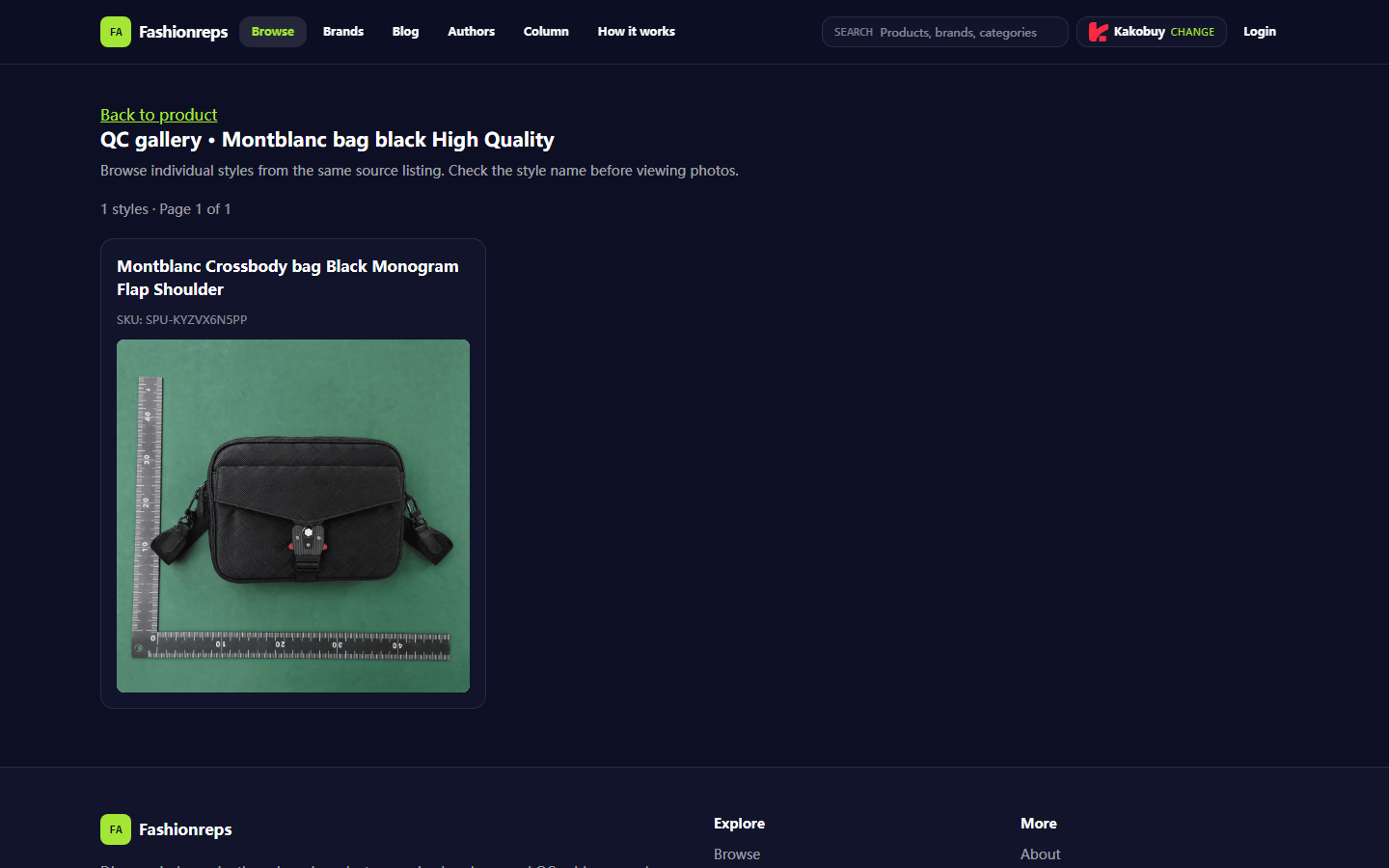
Before comparing discounts, fix the product identity. The QC page title visible in the profile is "Montblanc bag black High Quality". The specific style listed on the page is "Montblanc Crossbody bag Black Monogram Flap Shoulder", and it shows SKU: SPU-KYZVX6N5PP. The page also indicates that multiple styles may exist from the same source, and you should confirm the style name before viewing photos.
This information can only help you confirm which product you are verifying; it cannot automatically prove price, inventory, material, brand authenticity, or current availability. After entering the shopping agent, you should confirm again that the product title, specifications, product link, and options match the fashion-reps page. If the title, color, size, or SKU cannot be matched, stop the cost comparison first to avoid mixing amounts from different products.
It is recommended to save the following evidence from the product page:
- Product title and specific style name
- SKU or other unique identifying information
- The product amount and currency displayed on the page
- Available colors, sizes, or specifications
- Page access date
- Corresponding product information after entering the shopping agent
If the product page does not show a visible amount, do not fill in the price with search result summaries, old screenshots, or other products' prices. In this case, you can only record "current profile does not provide a verifiable product amount" and leave the final judgment to the cart or checkout page.
Find Currently Visible Discount Entrances, Applicability, and Validity on the Target Site
Discount verification should be completed within the shopping agent site where you actually plan to place the order. The fashion-reps page provides entry to select a shopping agent, but different agents may have different discounts, service fees, payment methods, and logistics rules. You cannot infer the same cost just because the product source is the same.
After entering the target site, check coupons, promotion pages, cart prompts, checkout page discount fields, and available account benefits in sequence. For each discount, record the original text or page display content, including at least:
- Discount type, such as fixed amount, percentage, shipping fee reduction, or service fee reduction
- Minimum order amount
- Applicable products, categories, warehouses, or order scope
- Applicable shopping agents and payment methods
- Start and end time, or validity period shown on the page
- Whether restricted to new users, specific accounts, or specific countries/regions
- Whether it can be combined with other discounts after use
Do not treat "available" as "applied", and do not treat the estimated discount in the cart as the final discount on the checkout page. A discount can only be used as cost comparison evidence when it clearly reduces the amount due in the order details and the applicable conditions match this order. 🧾
Separately Record Product Amount, Service Fees, Payment Fees, Packaging Fees, and Shipping Fees
Total cost cannot be judged solely by the product amount. It is recommended to record the same order's fee details before and after applying the discount, and keep the currency consistent.
| Cost Item | What to Check | Common Judgment Boundaries |
|---|---|---|
| Product Amount | Target style, quantity, currency, and page amount | Cannot substitute with similar styles or old prices |
| Service Fee | Purchasing, warehousing, inspection, or other agent service fees | May be calculated by product, order, or service type |
| Payment Fee | Payment channel surcharges, currency conversion, or account fees | May vary by payment method or currency |
| Packaging Fee | Basic packaging, reinforcement, special packaging, or repackaging fees | Cannot assume packaging is free or fixed |
| Shipping Fee | Destination country, route, weight, volume, and service level | Estimated amount may be adjusted after weighing |
| Taxes and Customs Clearance Costs | Destination country rules, declaration information, and carrier requirements | Should not be reduced by under-declaring, splitting orders, or avoiding inspections |
When comparing, you can use a simple formula in the same currency:
Estimated total cost before checkout = Product amount + Service fee + Payment fee + Packaging fee + Shipping fee + Clearly applicable taxes or customs clearance fees
Estimated total cost after discount = Discounted product or related fees + Service fee + Payment fee + Packaging fee + Shipping fee + Clearly applicable taxes or customs clearance fees
Apparent discount amount = Estimated total cost before applying discount - Estimated total cost after applying discount
If the discount causes a certain fee to be recalculated, you cannot simply use the coupon face value as the savings. For example, after the product amount decreases, it may no longer meet the threshold for free service fee or shipping; payment method changes may also generate new fees. Only after the checkout page details are fully displayed can you confirm the net change. 💰
Check Order Thresholds, Exclusions, and Whether Other Fees Are Affected
Before checkout, check discount conditions item by item. The focus is not the promotional language, but whether this order meets all conditions.
First, confirm which amount is used as the calculation basis for the order threshold. Some promotions may calculate based on product subtotal, while others may calculate based on the amount after deducting other discounts. If the page does not clearly explain, do not assume the two calculation methods are the same.
Then confirm exclusions. Brands, product categories, promotional products, special warehousing status, specified routes, or specific payment methods may affect applicability. Whether Montblanc accessories are excluded must be based on the current page of the target shopping agent and the checkout result, not inferred from the brand name.
Also check whether the discount changes other fees:
- Does it switch from standard service fee to another rate?
- Does it cancel or change packaging options?
- Does it affect free or discounted shipping thresholds?
- Does it require a specific payment method?
- Does it change the settlement currency or exchange rate display?
- Is it mutually exclusive with other discounts?
- Does it require completing payment before the validity period ends, rather than just adding to cart?
If the total amount decreases after applying the discount, but payment fees or shipping fees are not yet determined, mark the result as "partially verified" and do not state that savings are confirmed. ⚠️
Save Details Before and After Applying the Discount in Cart and Checkout Page
The most reliable approach is to save two states of the same order: before applying the discount and after applying the discount. The two records should try to keep the product, quantity, destination country, route, packaging options, and payment method consistent; otherwise, the comparison results are not comparable.
It is recommended to save the following fields:
- Recording time and time zone
- Target shopping agent name
- Product title, SKU, quantity, and currency
- Product subtotal
- Service fee
- Payment fee or payment method
- Packaging fee
- Shipping fee and its calculation conditions
- Display status of taxes or customs clearance fees
- Discount name, discount code, or system auto-application identifier
- Total before discount
- Total after discount
- Remaining fees to be confirmed as displayed on the page
When taking screenshots or exporting records, cover order numbers, names, addresses, phone numbers, payment card information, and other personal data. The purpose of saving evidence is to check fee changes, not to disclose accounts or complete shipping labels. 🔒
After submitting the discount code, if the page times out, returns an error, or the status is unclear, do not immediately resubmit or recreate the order. First check whether the cart and discount records have changed, then decide whether to retry, to avoid duplicate applications, duplicate orders, or unexplained payment statuses.
How to Stop Guessing and Reframe as a Verification Process When Current Discount Information Is Missing
When the profile does not have current product amounts, discount pages, service fees, or checkout details, the correct conclusion is not to estimate a savings amount, but to state that the amount verification cannot be completed at present.
You can clearly record:
- Which product style and SKU are confirmed by current profile
- Which fees are not confirmed by current profile
- On which page supplementary evidence is needed
- Which fields should buyers check before submitting orders
- Which results cannot be treated as lowest price or final total cost
For example, if you only have the product name and QC page summary, without price and checkout details, you can only confirm product identification information, not whether the discount applies or calculate savings. If the shopping agent page shows a discount but does not show payment fees or shipping fees, you can only judge that the discount has been displayed in a certain fee item, not whether the net cost of the entire order has decreased.
This kind of "stop guessing" record may not provide an attractive number, but it can avoid mistaking expired promotions, fees from different agents, or amounts from different styles as current facts. 📌
Montblanc Accessories Cost Judgment Checklist Before Submitting Order
Before submitting the order, review in the following order:
- Product title, style, color, specifications, and SKU match the target product
- Currency and verification date of product amount are recorded
- Shopping agent name and destination country are fixed
- Discount conditions, validity period, thresholds, and exclusions match this order
- Discount has been clearly applied in cart or checkout page
- Service fees, payment fees, packaging fees, and shipping fees are listed separately
- Currency conversion method and actual charge currency are confirmed
- Taxes and customs clearance requirements are handled according to destination country rules, without using under-declaration or inspection avoidance schemes
- Order details before and after applying the discount can be compared
- Fees not yet determined are clearly marked
- Page status is stable and there are no duplicate orders, duplicate payments, or unclear discount status prompts
The final judgment should use net cost changes, not promotional language. If the current details show that the total cost after discount has indeed decreased, the savings amount can only equal the difference between two comparable checkout details; if shipping fees, payment fees, or taxes are not yet determined, you cannot claim a specific savings amount.
This kind of review is more suitable for buyers who can save checkout evidence, are willing to check fees item by item, and understand destination country taxes and delivery conditions. It is not recommended to rush to submit when discount validity, fee items, or order status are unclear; it is also not recommended to buy unnecessary products to meet discount thresholds, because the added product amount may far exceed the net change from the discount.