Separate the Two Pants Listings for Verification If you are organizing Represent pants, first confirm which products the catalog actually displays instead of filling in nonexistent styles from old titles or keywords. The currently verifiable Represent catalog shows two products: one pair of multicolor athletic shorts, whose page title mentions 15 color options and S–XL; and one pair of gray Represent sweatpants. The catalog also shows a reference pr
Editor score 4.2 / 5
Separate the Two Pants Listings for Verification
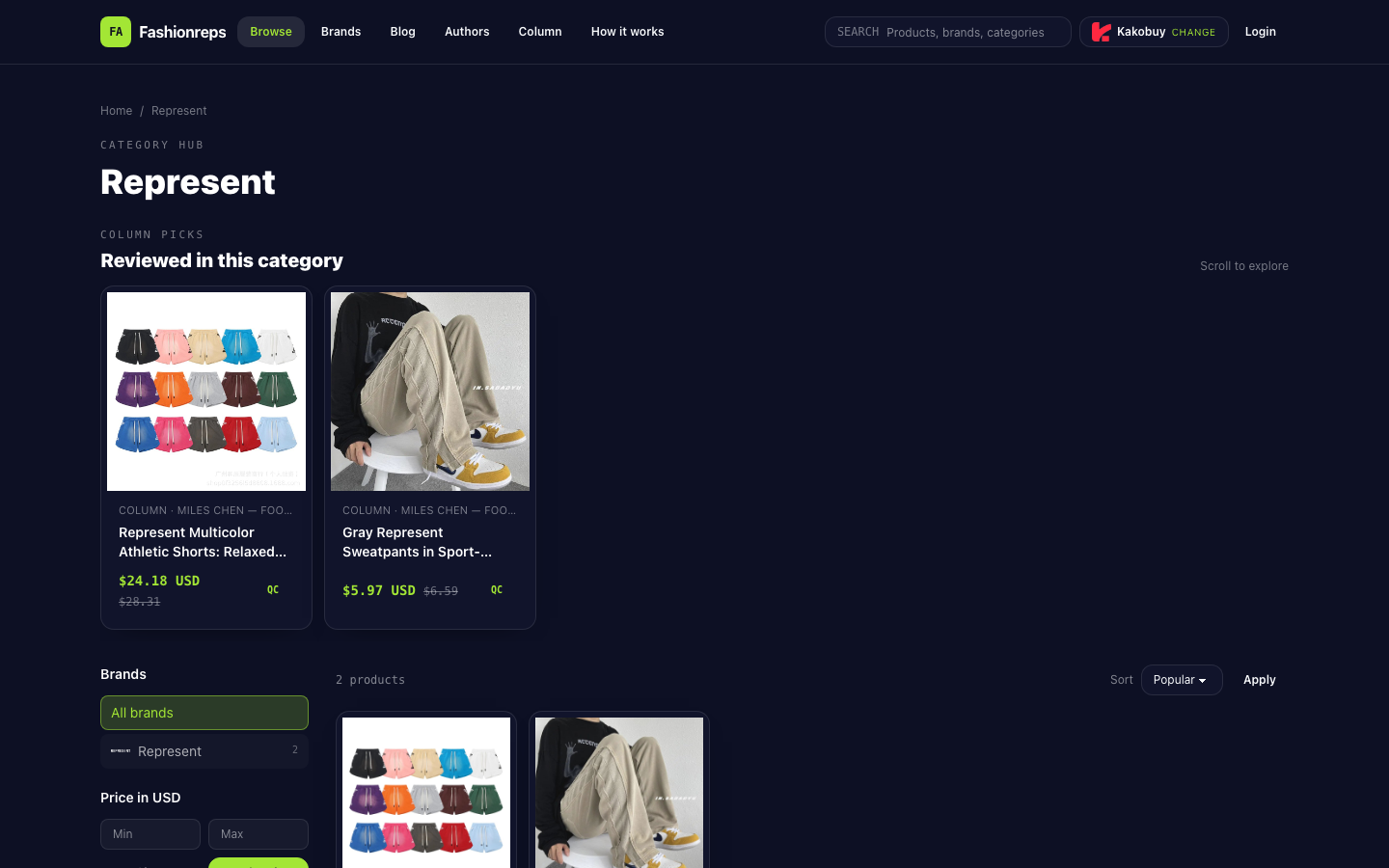
If you are organizing Represent pants, first confirm which products the catalog actually displays instead of filling in nonexistent styles from old titles or keywords. The currently verifiable Represent catalog shows two products: one pair of multicolor athletic shorts, whose page title mentions 15 color options and S–XL; and one pair of gray Represent sweatpants. The catalog also shows a reference price for each page, but these figures do not equal the final cost including shipping or taxes.

This is an AI illustration, not a product photo, QC photo, or firsthand evidence. The page screenshot only demonstrates information visible on the source page and cannot replace the checkout page.
What to Do First on the Catalog Page
Fashionreps' Represent catalog is useful for discovering candidates and returning to the original pages. During verification, follow this order:
- Confirm the current brand category, product count, and filter conditions.
- Record the exact title, category, color description, and reference price shown on each product card.
- Open the product detail page and check whether the images, color options, size information, product link, and QC entry all correspond to the same product.
- Record separately what the page explicitly states and which fields have not yet appeared.
- If the catalog title conflicts with the detail page, use the product page that can be revisited as the reference, and preserve the conflict for further review.
The current source page confirms multicolor athletic shorts and gray sweatpants. It does not support rewriting them as T-shirts or adding inventory, materials, shipping costs, or wearing experience.
Use a Table to Track Confirmed and Unverified Details
The table's purpose is to consolidate results from multiple page checks. It cannot create new product facts or replace the product detail page or QC section. We recommend using one row for each catalog candidate. Only split different colors into separate rows when the product page explicitly lists color variants.
| Field | Suggested record |
|---|---|
| Product title | Preserve the catalog or detail-page title as written; do not present assumptions as conclusions |
| Brand and category | Record the Represent brand and pants category explicitly shown on the page |
| Color | Enter only colors explicitly listed on the page; do not expand "multicolor" yourself |
| Size | Preserve the page's actual format, such as S–XL; mark it as unverified if not shown |
| Page reference price | Record the reference price shown on the page and note the verification date |
| Product link | Save the address that returns to the corresponding detail page |
| Image status | Distinguish between catalog images, detail-page images, QC images, or not found |
| Evidence status | Confirmed, unverified, or excluded |
| Notes | Record title conflicts, unusual specifications, and fields requiring seller confirmation |
A specification block related to DUNK-style footwear appears next to the gray sweatpants title. The catalog page alone cannot explain this combination as a pants attribute, so the shoe specifications must not be rewritten as the pants' size, material, or fit information. Mark it in the table as "seller evidence needed," preserve the original page wording, and wait for the corresponding product details or seller confirmation.
How to Avoid Misrecording Colors and Sizes
Color verification should distinguish among three statuses: when the page explicitly lists specific colors, record them as confirmed; when the title only says "multicolor" without a color list, record them as unverified; and when the page provides no color information, leave the field blank and note "not shown on page." A blank does not mean the product lacks that color. It only means the current evidence is insufficient.
Use the same method for sizes. The catalog title for the multicolor athletic shorts explicitly states S–XL, so you can record that range, but you still cannot infer that every color has the same inventory or purchasing availability. If the gray sweatpants page does not clearly provide pants sizing information, do not use the possibly footwear-related specification block beside it to fill in the table.
What the Catalog and Table Each Handle
The catalog is responsible for discovering products, viewing cards, opening details, browsing images, and returning to source links. The table is responsible for organizing these verification results by field, filtering for items needing evidence, preserving conflicts, and allowing later collaborators to see the same review status.
To avoid misleading records, use the following three status levels:
- Confirmed: The source page directly supports the field, and the corresponding product can be revisited.
- Unverified: The title or images appear relevant, but the color, size, category, or specifications remain incomplete.
- Excluded: The category does not match, the link is invalid, or it is impossible to confirm which product the record refers to.
Do not turn "confirmed" into "recommended for purchase," and do not rewrite a catalog reference price as the final delivered price. When the source materials do not provide inventory, shipping, discounts, or specific purchasing conditions, those columns should remain unconfirmed.
A Reviewable Record-Keeping Process
Start by opening the Represent catalog and recording the two pants product cards that actually appear. Then enter each detail page separately and verify the product title, color, size, page reference price, images, and QC entry. When you find a conflicting field, do not overwrite the original value. Instead, note the location of the conflict and what evidence is needed in the remarks.
Next, mark each field as confirmed, unverified, or excluded, then filter the table by evidence status. During review, update only fields that have demonstrably changed on the page, and retain the new check date. If a product link stops working or the page clearly belongs to another category, remove it from the purchasable candidates instead of continuing to use the old record.
Once organized this way, the table does not replace the catalog. It becomes an index of the catalog evidence: colors and sizes have sources, unusual specifications are not mistaken for pants information, and unverified details remain clearly marked as needing evidence.